Here is a number that might make you uncomfortable: the average Android user picks up their phone over 80 times a day and spends nearly four hours on it. If that sounds about right for you, you are not alone. The latest phone addiction statistics paint a clear picture: most of us are spending far more time on our screens than we would consciously choose to.
The good news? Awareness is the first step toward change. And the single most effective way to build that awareness is to install a screen time app that actually shows you where your hours go. Once you see the numbers, you cannot unsee them. The question is: which app deserves a spot on your home screen?
We spent weeks testing the most popular phone usage tracker apps on Android to help you decide. Below are our seven picks for 2026, covering everything from Google's built-in tools to gamified trackers and friction-based approaches. We have tried to be genuinely fair here. Every app on this list has real strengths, and the best one for you depends on what actually motivates you to change.
What to Look for in a Screen Time App
Before we jump into the list, here is a quick framework. Not all digital wellbeing apps are created equal, and the flashiest features do not always matter most. When evaluating a screen time app, consider these four things:
- Privacy: A screen time app sees everything you do on your phone. Does the app keep your data on-device, or does it upload usage data to a server? Read the privacy policy. If the app is free and ad-supported, your data might be the product.
- Ease of use: If the app is confusing to set up or annoying to check, you will stop using it within a week. The best screen time apps are the ones you actually open.
- Motivation approach: Some apps show you cold, hard numbers. Others use gamification to make behavior change feel rewarding. Some add friction to make bad habits harder. There is no universally "right" approach. It depends on your personality.
- Customization: Can you choose which apps to track? Set your own daily limits? Customize notifications? One-size-fits-all rarely fits anyone well.
With those criteria in mind, here are the seven best screen time apps for Android in 2026.
The 7 Best Screen Time Apps for Android
1. Google Digital Wellbeing
Best for: Getting started with zero effort
If you own an Android phone, you already have this one. Google Digital Wellbeing is baked right into your device settings, no download required. It shows a clean dashboard of your daily screen time, broken down by app, along with how many times you have unlocked your phone and how many notifications you have received.
The feature set is intentionally basic: app timers that pause an app when you hit your limit, a Wind Down mode that fades your screen to grayscale at bedtime, and Focus mode that temporarily blocks distracting apps. It all works reliably and looks great with Material You theming.
The catch? It is very easy to dismiss. When an app timer runs out, you can override it with a single tap. There is no accountability layer, no rewards for good behavior, and no real consequence for ignoring the limits. For people who need a gentle nudge, it is perfect. For anyone who needs more than a nudge, it tends to fade into the background.
Price: Free (built-in)
Standout feature: Focus mode for scheduling distraction-free blocks
Limitation: Easy to override, no motivational layer
2. ActionDash
Best for: Data lovers who want detailed analytics
ActionDash is essentially Google Digital Wellbeing with a PhD in data visualization. If you are the kind of person who finds a well-designed chart genuinely motivating, this app will feel like coming home. It provides deep usage analytics with beautiful Material Design charts, including daily and weekly breakdowns, per-app usage trends, longest sessions, and screen unlock patterns.
The "Digital Assistant" feature learns your habits over time and highlights unusual spikes in usage. You can also set usage goals and track your progress across days and weeks, which gives you a sense of trajectory that the built-in Android tools lack.
Where ActionDash falls short is in the "now what?" department. It is fantastic at telling you that you spent three hours on Reddit yesterday, but it does not do much to help you spend less today. There is no gamification, no app blocking, and no accountability system. It is a mirror, not a coach.
Price: Free with ads / Premium ~$5 one-time
Standout feature: Usage trend analysis and historical comparisons
Limitation: Analytics only, no blocking or motivation features
3. StayFree
Best for: An all-in-one screen time toolkit
StayFree is one of the most popular screen time apps on the Play Store, and for good reason: it tries to do everything. Usage tracking, app blocking, floating usage timers that appear over your apps, overuse reminders, a website blocker for Chrome, and cross-device syncing if you use it on multiple devices.
The floating timer is a particularly clever touch. Seeing a live counter of "47 minutes on Instagram today" while you are scrolling Instagram is a surprisingly effective reality check. The app also offers scheduled app blocks (block TikTok during work hours, for example) and a "strict mode" that makes it harder to override your own limits.
The downside is that StayFree can feel cluttered. There are a lot of features, and the UI is not as polished as some alternatives. The free tier also includes ads, which feels a bit ironic in a digital wellbeing app. But if you want a Swiss Army knife for screen time management, StayFree covers more ground than most.
Price: Free with ads / Premium ~$20/year
Standout feature: Floating usage timer overlay
Limitation: Busy UI, ads in free tier
4. YourHour
Best for: Simple, clean awareness tracking
YourHour takes a refreshingly minimalist approach. The home screen shows your total screen time, unlock count, and a "phone addiction score" that gives you a quick gut-check on how your day is going. No clutter, no overwhelming dashboards, just the numbers that matter.
The unlock count tracking is especially useful. Most people do not realize how many times they pick up their phone out of pure habit. Seeing "You have unlocked your phone 62 times today" is the kind of awareness that can change behavior on its own. YourHour also supports brief motivational messages and lets you set daily goals.
The app keeps things simple by design, which is both its strength and its limitation. If you want detailed per-app analytics or app blocking, you will need to look elsewhere. But if you just want a clean, honest mirror that tells you how much you are using your phone, YourHour does that better than almost anything else.
Price: Free with ads / Premium ~$4 one-time
Standout feature: Phone addiction score and unlock tracking
Limitation: No app blocking, limited customization
5. Unfried
Best for: People who have tried other screen time apps and stopped using them
Full transparency: this is our app, so take this section with a grain of salt. That said, we built Unfried specifically to solve a problem we experienced ourselves: screen time apps that show you the numbers but do not give you a reason to care about them.
Unfried works differently from traditional phone usage tracker apps. Instead of showing you charts and timers, it gives you a fry character with a health bar that drains minute by minute as you use the apps you pick. You choose a daily goal (30 minutes to 2 hours) and that is how long the bar lasts. As it drains, the fry moves through visible states: sweating, then heavy sweating, then dying. Hit zero and your fry gets fried: your tracked apps are blocked, and the only way to wake it is to put the phone down and do something else. It can't die for good, so you never lose it, but a collapse wipes the streak you spent days building. The bar refills every morning, so a bad day never carries into the next one.
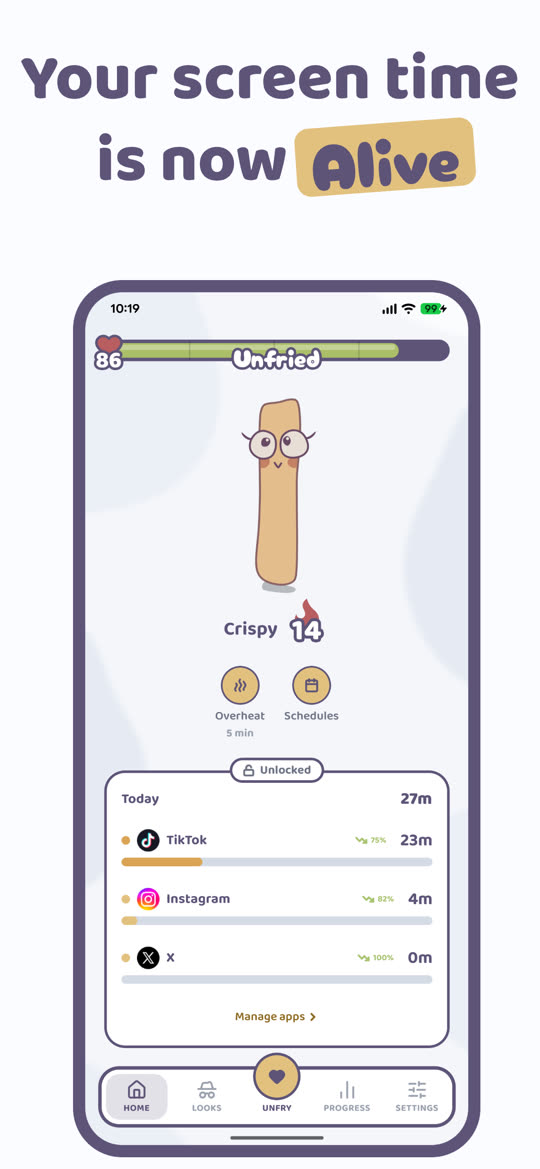
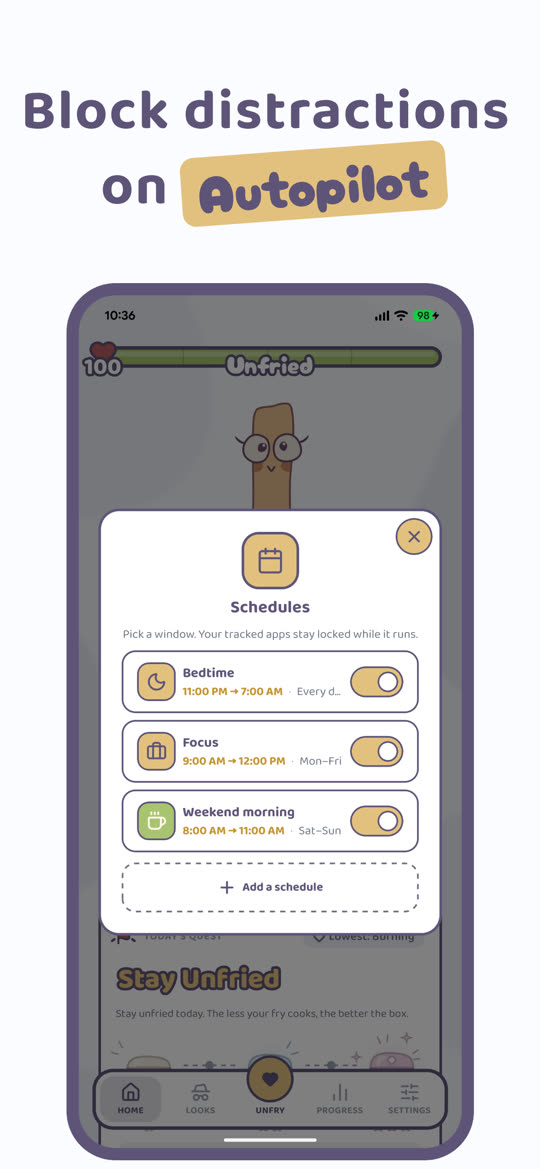
It also blocks apps, which a lot of trackers don't. Tap Unfry and your tracked apps are blocked while you step away, and the longer you stay away, the more health your fry gets back. Schedules block them at set hours, like bedtime or work. Overheat blocks them on its own after a stretch of nonstop scrolling, and they stay blocked until you open Unfried and let the fry cool down.
It sounds silly, and it kind of is. But gamification works for building habits. There is real psychology behind why you will put down your phone to keep a cartoon fry alive when you would not do the same for a bar chart. You get attached to your fry, especially once it has survived a few days. Every day it survives pays a box with a hat, a face or a new colour inside, and bigger boxes land on milestone days.
On the privacy front, Unfried is local-first: your per-app screen time, tracked apps, fry history, hats, and settings are stored on your device in SQLite and never uploaded. There are no user accounts and no in-app ads. A few third-party services are used for specific product functions (RevenueCat for subscriptions, Firebase Firestore for version checks and optional user feedback, and PostHog plus Firebase Analytics for anonymous product and advertising analytics). Full details are in the Privacy Policy. Unfried is a paid app with no free tier; using it requires a subscription.
The main limitation is that Unfried is focused specifically on reducing time on addictive apps (social media, short-form video, etc.), not on comprehensive screen time analytics. If you want detailed charts and cross-device syncing, a tool like ActionDash or StayFree will serve you better. But if your problem is that you know you spend too much time on TikTok and just need a reason to stop, that is exactly what Unfried was built for.
Price: $39.99/year with the first 7 days free, or $2.99/week. No free tier
Standout feature: A fry with a health bar, plus app blocking that's hard to skip
Limitation: Focused on addictive apps, not full device analytics
6. Forest
Best for: Focus sessions and study blocks
Forest has been around for years and remains one of the most beloved productivity apps on the Play Store. The concept is beautiful in its simplicity: when you want to focus, you plant a virtual tree. Stay off your phone for the timer duration, and the tree grows. Pick up your phone, and the tree dies. Over time, you build a lush forest that represents your focused hours.
The visual metaphor is genuinely effective. There is something deeply satisfying about watching your forest grow, and the guilt of killing a tree is just enough friction to make you think twice before mindlessly opening Instagram. Forest also partners with a real tree-planting organization, so your virtual trees can translate into real ones, a nice touch that adds a layer of meaning.
The important distinction is that Forest is primarily a focus timer, not a screen time tracker. It does not tell you how much time you spent on each app today. It works in the opposite direction: you proactively start a focus session, and it helps you stay off your phone during that window. If you are looking to reduce overall screen time, Forest is best used alongside a tracking app rather than as a replacement for one.
Price: ~$4 one-time (Android)
Standout feature: Real tree planting, beautiful visual forest
Limitation: Focus timer, not a usage tracker, so it does not monitor daily screen time
7. One Sec
Best for: Breaking the automatic "open app" reflex
One Sec takes a fundamentally different approach from every other app on this list. Instead of tracking your screen time or gamifying your usage, it adds a brief pause, a breathing exercise, every time you try to open a distracting app. You tap on Instagram, and instead of the app launching immediately, you get a calm screen asking you to take a deep breath for a few seconds. After the pause, it asks: "Do you still want to open Instagram?"
The psychology here is sound. Most of our phone usage is not a conscious decision. It is a reflex. We are bored for three seconds and our thumb is on TikTok before our brain even registers what happened. By inserting a moment of mindfulness between the impulse and the action, One Sec gives your conscious mind a chance to catch up. The developers report that users open targeted apps up to 57% less after installing it.
One Sec does include basic usage analytics (it tracks how often you opened each app and how often you decided not to after the pause), but it is not a comprehensive screen time tracker. It is laser-focused on breaking the reflex loop. Some people find the constant interruptions annoying, but if you are honest with yourself about how much of your phone use is truly unconscious, the slight friction is exactly the point.
Price: Free trial / Premium ~$5/month
Standout feature: Breathing pause before opening distracting apps
Limitation: Not a full usage tracker, some users find pauses disruptive
Quick Comparison
| App | Approach | App Blocking | Privacy | Price |
|---|---|---|---|---|
| Digital Wellbeing | Dashboard + timers | App timers (easy override) | Google ecosystem | Free (built-in) |
| ActionDash | Deep analytics | No | On-device | Free / ~$5 |
| StayFree | All-in-one toolkit | Yes (with strict mode) | Cloud sync optional | Free / ~$20/yr |
| YourHour | Minimalist awareness | No | On-device | Free / ~$4 |
| Unfried | Health bar + blocking | Yes (one tap, schedules, auto) | On-device, no account | $39.99/yr or $2.99/wk |
| Forest | Focus timer | During sessions only | Account optional | ~$4 one-time |
| One Sec | Friction / mindfulness | No (adds pause instead) | On-device | Free / ~$5/mo |
Is There a Free Screen Time App for Android?
Yes. Google Digital Wellbeing is free and already on most Android phones. ActionDash, StayFree and YourHour all have free versions too, paid for by ads, with premium upgrades that remove them.
Free is a fine place to start. The catch is that free tools are easy to wave off: one tap past a timer and you're back in the app. If you tried them and the numbers stopped meaning anything after a week, you probably need something with more pull, not more charts.
Unfried isn't free. It's $39.99 a year with the first 7 days free, or $2.99 a week. That pays for an app with no ads and no account, where your screen time stays on your phone.
So, Which Screen Time App Should You Use?
Here is the honest answer: the best screen time app is the one you will actually keep using.
That probably sounds like a cop-out, but it really is the most important factor. The graveyard of abandoned productivity apps on the average phone is proof that features alone do not determine success. What matters is whether the app's approach matches how your brain works.
If you just want to see the numbers without installing anything new, Google Digital Wellbeing is already on your phone. Start there.
If you are motivated by data and want to geek out over usage trends, ActionDash is your best bet. Pair it with StayFree if you also want blocking features. If blocking is the main thing you need, our list of the best app blockers for Android goes deeper on it.
If you have tried the "just track it" approach and found yourself ignoring the numbers, you might need an emotional hook. That is where Unfried or Forest come in. They turn the abstract concept of "screen time" into something you genuinely care about (a fry character or a growing forest).
And if your core problem is the unconscious reflex of opening apps without thinking, One Sec addresses that specific pattern better than anything else.
Many people find that combining two approaches works best. For example, One Sec for friction plus Unfried for ongoing motivation, or Digital Wellbeing for awareness plus Forest for focused work sessions. There is no rule that says you can only use one.
Whatever you choose, the fact that you are reading this article means you are already ahead of most people. Awareness really is the first step. Now pick an app, give it an honest week, and see what changes. You might be surprised how much time comes back to you when you start paying attention to where it goes. If you need more practical tips beyond just apps, check out our guide on how to reduce screen time for strategies you can start using today.